

White Label VTOL UAV Simulator for Scalable Pilot Training
2026-11-16
Conventional UAV training often stalls right when demand scales, because simulators are either too generic or locked into someone else’s brand. A white label VTOL UAV simulator removes that ceiling. It gives training providers a turnkey environment for fixed-wing, quadplane, and multirotor workflows without rebuilding the software stack. Powered by SRIZFLY, this approach shifts pilot development from one-off sessions into a repeatable system. Here’s what that means for your program.
Where Most VTOL Training Programs Stall Before the First Hover
Most programs don't fall apart in the air; they stall on the ground, usually in the gap between classroom simulation and the first real throttle input. Students spend weeks memorizing emergency checklists and flying stable approaches in software, but the moment they sit in the actual cockpit, the noise, vibration, and seat position feel foreign. Instructors often mistake this for nervousness and keep adding more briefings, when what the student actually needs is shorter, repeated exposure to the real aircraft systems before anyone expects a clean hover.
Another common stall point is the first sustained power increase. The lesson plan calls for a quick hop, but the student hasn't developed the fine motor habit of making small collective adjustments while watching the skids. They overcontrol, the aircraft starts to drift, and the instructor takes the controls to save the attempt. That single takeover teaches the wrong lesson. The student learns to wait for correction instead of riding the instability. Programs that avoid this tend to use deliberately boring ground exercises such as taxiing, light-on-skids, and two-second power pulls so the first hover doesn't feel like a test.
Maintenance downtime also stalls more first hovers than bad technique does. A school that runs one or two aircraft often cancels the first flight block for a minor sensor issue, then pushes the student back into the simulator for another week. The student starts associating the real aircraft with delay and uncertainty. The fix isn't more training equipment; it's scheduling the first low-power sessions when a backup aircraft or a quick maintenance window is actually available.
What Changes When Your Logo Sits Inside a VTOL Trainer
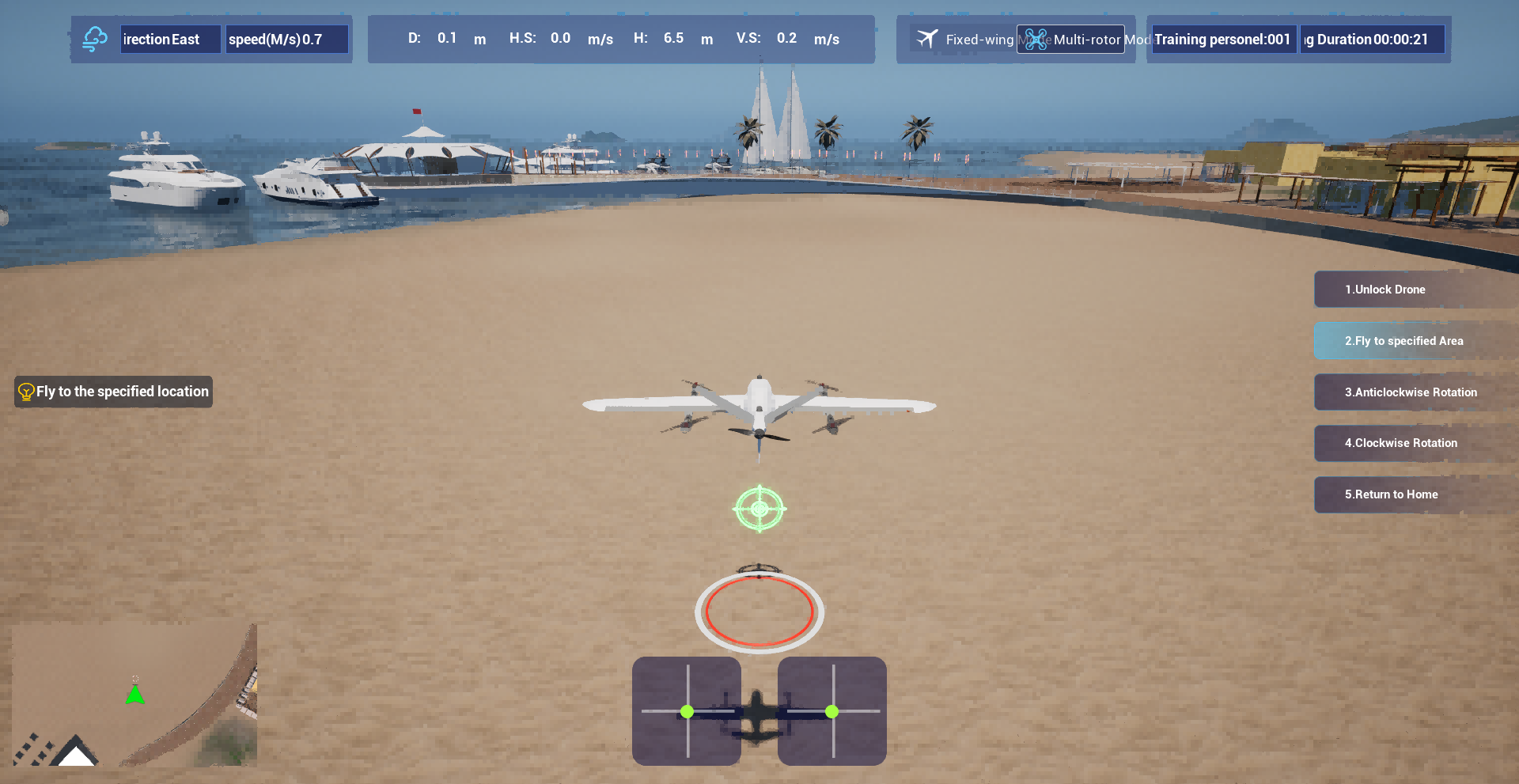
Placing a logo inside a VTOL trainer shifts it from flat branding to something the pilot lives with. The reflective canopy, the angle of the instrument panel, and the vibration during hover all change how the mark is seen. A static vector file no longer tells the whole story; you start noticing whether the edges catch glare, whether the colors hold up under the floodlights, and whether the placement survives the pilot's forward scan without becoming a distraction.
The logo also starts to accumulate context. It appears during preflight checks, sits near scuffed handholds, and gets caught in the same shadow lines that move across the cockpit. In that setting, the mark feels less like a printed asset and more like part of the machine's identity. If it's placed well, it reads as a quiet signature rather than an advertisement. If it's placed poorly, it becomes a bright spot that pulls attention away from the instruments.
Running Multi Site Pilot Assessments Without Shipping Simulators Around
Coordinating pilot assessments across multiple sites usually means packing simulators into crates, scheduling freight, and hoping nothing gets damaged en route. But there is a quieter approach that skips the logistics altogether. Teams can run identical scenarios through a central, cloud-hosted simulation environment, letting each location log in with local hardware instead of waiting for a shared unit to arrive. This removes the usual downtime between site visits and lets every facility start testing on the same day.
The trick is keeping the experience consistent without physical standardization. Instead of relying on one calibrated device, you provide clear setup guidelines for local equipment and stream the same virtual models, patient vitals, and instructor cues to every screen. Trainers watch live feeds or recorded sessions from a single dashboard, so a site in one city is not interpreting a scenario differently from a site two time zones away. That kind of parity is hard to achieve when a simulator has bounced around in a truck for a week.
There is also a hidden benefit: local teams take more ownership when they are not borrowing a traveling rig. They adjust the space, manage their own schedules, and often run extra practice sessions because access is immediate. Meanwhile, the core program stays intact, since the scenario library and scoring rubrics live in one place. What gets removed is not the rigor—it is the crate, the courier, and the constant worry about whether the equipment will survive the next loading dock.
Teaching Hover and Transition Handling Before the Aircraft Leaves the Hangar
Hover and transition work should begin in the hangar because the enclosed space removes wind and low-light variables that can mask a student's control inputs. Instead of starting with a full taxi, instructors can have learners hold a light hover while watching the nose, skid or wheel references just a few feet away. Small pedal, cyclic or thrust adjustments become easier to feel when the aircraft is still close to familiar floor markings and the student is not fighting gusts.
A useful sequence is to separate the hover into power, heading and position, then introduce the transition as a slow handoff between two of those elements. The instructor calls for a stable hover first, then asks the learner to ease the nose forward while expecting the aircraft to settle. Keeping the movement gradual lets the student notice the point where hover authority gives way to forward flight, and the instructor can guard the controls without needing to take over immediately.
Dry runs work better here than long briefings. Have the learner touch each control, describe the pressure and direction before moving it, and then repeat the sequence until the transition feels less like a memorized series of steps. Only when the student can hold a steady hover and enter forward flight without prompting should the aircraft be moved toward the hangar door.
Expanding a Pilot Pipeline Without Burning Out Instructors
Scaling a pilot course usually stalls because the same few instructors absorb every new section. Treat instructor capacity as a design constraint from the start, not an afterthought. If a new cohort requires two additional mentors per week, map that against existing teaching loads before opening the section. The pipeline grows only as fast as the people who can actually carry it.
Pairing experienced instructors with apprentices shifts the pressure point. Instead of asking veterans to run more live sessions, ask them to review lesson plans, sit in on one session, and hand over routine feedback. The apprentice handles scheduling, reminders, and the first pass on student questions. That split keeps the veteran's hours nearly flat while giving new instructors enough context to lead later.
Another part of the fix is to stop treating every pilot cycle as an emergency. Rotate instructors by term, keep a shared runbook updated, and protect at least one prep-free week between cohorts. When people know the next expansion will not quietly double their workload, they stop resisting it.
White Label Simulators That Mirror Your Aircraft Handling Instead of Generic Physics
Most off-the-shelf simulators apply a broad physics model that makes a Cessna, a King Air, and a light jet feel suspiciously alike once the displays are ignored. A white label simulator built around your actual aircraft starts from the opposite end. It uses recorded flight test data, manufacturer performance charts, and pilot feedback to shape the core handling responses, so pitch authority, roll rate, yaw tendency, and trim behavior match the airframe you operate rather than a generic category average.
The details matter most in the edges of the envelope. Instead of a standard stall buffet that appears at a textbook angle, the model can reproduce the specific pre-stall shudder, wing drop tendency, or mushy aileron feel your pilots know from the real cockpit. Ground handling gets the same treatment: nosewheel steering authority, brake sensitivity, and crosswind weathervaning are tuned to the aircraft, not borrowed from a default template. Even control harmony, the relationship between stick force and surface deflection, can be shaped so procedural training feels familiar rather than slightly foreign.
For operators, the white label layer keeps the branding, cockpit layout, and training workflow under your control while the flight model stays faithful to the machine underneath. That combination reduces the subtle negative training that creeps in when a simulator feels close but not quite right. Pilots spend less time adapting to the device and more time refining the habits they will carry into the actual aircraft.
FAQ
The provider controls much more than the logo. They can reshape the cockpit layout, set the flight envelope limits, choose which sensor feeds appear during missions, and decide how a passing score is calculated. That means the training reflects the way their own aircraft actually behaves.
The transition is introduced as a progressive series of small attitude and airspeed changes rather than one manual switch. New pilots first watch the control surfaces respond in slow time, then repeat the maneuver with visual cues that fade as their control inputs become smoother.
Yes. Each airframe can be loaded as a separate performance profile with its own mass, thrust, battery draw, and control authority. Mission sets can also be swapped, so a pilot might move from pipeline inspection to coastal survey without leaving the same training environment.
Scalability comes from separating the instructor role from routine practice. A lead instructor can assign self-paced modules, set automatic pass thresholds, and review only the flights that fall outside normal parameters, so adding more pilots does not require a linear increase in staff time.
Emergency work is built around decision points rather than scripted button presses. A failed motor, a GPS dropout, or a battery thermal warning appears mid-mission, and the pilot has to choose between continuing, landing immediately, or entering a degraded flight mode. The debrief then shows how those choices changed the outcome.
A standard station can run on a mid-range workstation with a joystick, throttle, and rudder pedals. The simulator is built to distribute aircraft profiles and scenario updates from a central server, so expanding to another room or another site does not mean rebuilding each installation by hand.
Yes. The entire interface can carry the organization's visual identity, but more importantly, the reports can be formatted around internal training codes and operational categories. That keeps the data useful for safety meetings, certification audits, and maintenance reviews without extra translation work.
Weather is treated as a training variable rather than a background effect. Instructors can introduce gust layers, low visibility, icing conditions, or shifting wind directions to force pilots to manage energy and situational awareness, and the aircraft responds to those conditions with the same aerodynamic penalties they would see in flight.
Conclusion
Most VTOL training programs stall long before the first hover, and the reason is rarely the student. The aircraft are expensive, weather windows are tight, and moving trainees to a centralized simulator lab slows everything down. A white label VTOL UAV simulator changes that equation by putting an aircraft-specific model on ordinary hardware. Instead of wrestling with a generic quadcopter physics engine, trainees learn the actual hover and transition quirks of the airframe they will fly. Those early hours become useful because the control feel, lag, and failure responses mirror the real platform. Multi site assessments also become practical: operators can run the same evaluation at three different locations without shipping simulators or instructors back and forth.
The second shift happens when your logo and operating procedures live inside the trainer. That may sound cosmetic, but it changes how seriously pilots and clients take the system. A branded interface with your checklists, voice callouts, and maintenance limits makes the simulator feel like company equipment rather than a borrowed training tool. It also lets instructors scale their time. Novices can repeat hover and transition drills on their own, while instructors focus on decision making and abnormal procedures. The result is a pilot pipeline that expands without adding more flight hours to the schedule or burning out the senior staff who usually carry the training load. The simulator does not replace stick time; it makes the stick time count.
Contact Us
Contact Person: Niles Liu
Email: [email protected]
Tel/WhatsApp: 8619945009803
Website: https://srizfly.com/